Atomic rate limiting with Redis and Lua, measured
Lua makes a Redis rate limiter atomic. I measured what that costs, and three ways the scripts still break: timestamp members that admit 12× the limit, keys Cluster rejects, and logs that stall Redis.
LimitYourAPI answers one question over and over: may this request go through? The answer has to be the same whether one worker asks or fifty ask at once. In an earlier study I measured which Redis limiters get that answer right, and the ones that did all made the decision in one atomic step, usually a Lua script. This post measures the other half: what those scripts cost, and how they still go wrong once they're atomic.
Every number here comes from seven experiments I ran for this post, on Redis 7.0 on a 4-core virtual machine over loopback, with Redis pinned to a core of its own. Your absolute numbers will differ; the comparisons are the point. The code and raw data are linked at the end.
The race
The obvious limiter reads a counter, compares it with the limit, and writes it back. With one process that's fine. With stateless workers behind a load balancer, two workers can read 99 at the same moment, both decide there's room for one more, and both let their request through.
// Looks right, races under load: the read and the write are separate round trips.
n, _ := rdb.Get(ctx, key).Int()
if n >= limit {
	return false
}
rdb.Incr(ctx, key)
return true
Every fix comes down to the same thing: the read, the decision and the write have to be one indivisible step. WATCH and MULTI can do it optimistically, but conflicting clients retry, and in the earlier study a 10-retry budget refused 42% of legitimate requests under contention. A Lua script avoids that. Redis runs a script to completion before it serves any other command, so everything inside it is atomic, and the whole decision costs one round trip.
The token bucket script
A token bucket holds up to capacity tokens and refills at rate tokens per second. Each request spends one token, or more for expensive endpoints. Its whole state is two numbers, so it fits in one hash: how many tokens are left, and when they were last counted.
-- KEYS[1]  the bucket, one per client and route
-- ARGV[1]  capacity: the most tokens the bucket holds
-- ARGV[2]  rate: tokens added per second
-- ARGV[3]  cost: tokens this request spends
local capacity = tonumber(ARGV[1])
local rate     = tonumber(ARGV[2])
local cost     = tonumber(ARGV[3])

-- One clock for every worker: Redis's own.
local t   = redis.call('TIME')
local now = tonumber(t[1]) * 1000 + math.floor(tonumber(t[2]) / 1000)

local state  = redis.call('HMGET', KEYS[1], 'tokens', 'ts')
local tokens = tonumber(state[1]) or capacity
local ts     = tonumber(state[2]) or now

-- Refill for the time that passed, never above capacity.
tokens = math.min(capacity, tokens + (now - ts) / 1000 * rate)

local allowed = 0
if tokens >= cost then
  tokens  = tokens - cost
  allowed = 1
end

redis.call('HSET', KEYS[1], 'tokens', tokens, 'ts', now)
-- An idle bucket is full again after capacity / rate seconds; after that it carries no information.
redis.call('PEXPIRE', KEYS[1], math.ceil(capacity / rate * 1000))

return { allowed, math.floor(tokens) }- The clock is Redis's. Stateless workers on different machines never agree perfectly on the time, and the earlier study showed what caller clocks do to a token bucket. Reading
TIMEinside a script is safe on Redis 7 because scripts are replicated by their effects: the replica receives theHSETwith the computed values, not the script. I checked: after 10,000 calls, all 100 buckets on a replica matched the primary exactly, down to their expiry times. - Refill is computed, not scheduled. Nothing ticks in the background; the script works out how many tokens accrued since the last request.
- Keys expire. A bucket idle long enough to refill completely says nothing a fresh bucket wouldn't, so its TTL is exactly that long, and memory follows active clients rather than every client ever seen.
- It returns what's left as well as the decision, so the API can send rate-limit headers without a second call.
What one decision costs
Sixteen clients sent decisions as fast as they could, spread over 10,000 keys like normal traffic, for five 5-second runs per strategy. The cost that matters is Redis's: it runs commands on one thread, so the CPU that thread spends per decision sets how many decisions one Redis can make. A plain GET is there for scale.
| Strategy | Redis CPU per decision | × a GET | Decisions per second |
|---|---|---|---|
GET (no limiter) | 7.1 µs | 1.0× | 118,422 |
Fixed window, INCR + PEXPIRE in MULTI | 10.5 µs | 1.5× | 82,732 |
| Fixed window, Lua | 17.5 µs | 2.5× | 53,772 |
| Token bucket, Lua | 21.4 µs | 3.0× | 43,991 |
| Sliding-window counter, Lua | 22.1 µs | 3.1× | 41,083 |
| Sliding-window log, Lua, L = 100 | 24.2 µs | 3.4× | 39,374 |
| Sliding-window log, Lua, L = 10,000 | 24.5 µs | 3.5× | 39,033 |
- A Lua decision costs 2.5 to 3.5 times the Redis CPU of a
GET: on this machine, the scripts ran at 39,000 to 54,000 decisions a second, with Redis's one thread at least 91% busy. The script itself accounts for 8 to 15 µs of that; the rest is the network work every command pays. - A fixed window doesn't need a script.
INCRandPEXPIREinsideMULTIrun as one atomic step too, and they made 54% more decisions per second than the same logic in Lua. A script earns its cost when the decision has to read state before writing it. - The sliding log's limit barely changes its CPU cost: L = 100 and L = 10,000 were within run-to-run noise. Its cost is memory.
- One abusive client hammering a single key is cheaper per decision than normal traffic, because nearly every call is a refusal and skips the writes.
Memory per client
I filled between 100 and 10,000 clients to their limit (fewer for the largest limits) and divided the growth in Redis's memory by the number of clients, which counts the key, its expiry and Redis's bookkeeping.
| Strategy | Keys per client | Memory per client |
|---|---|---|
| Fixed window | 1 | 124 B |
| Sliding-window counter | 2 | 245 B |
| Token bucket | 1 | 186 B |
| Sliding-window log, L = 128 | 1 | 5.2 KB |
| Sliding-window log, L = 129 | 1 | 19.1 KB |
| Sliding-window log, L = 1,000 | 1 | 126.4 KB |
| Sliding-window log, L = 10,000 | 1 | 1.4 MB |
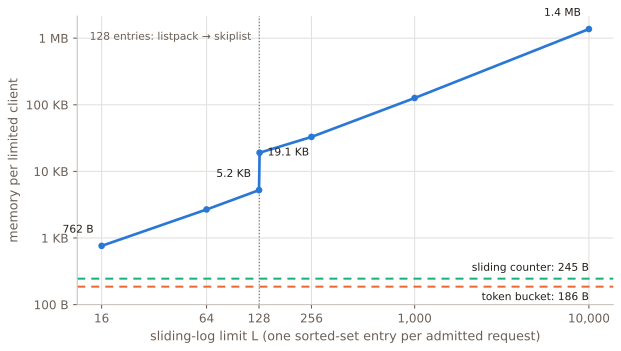
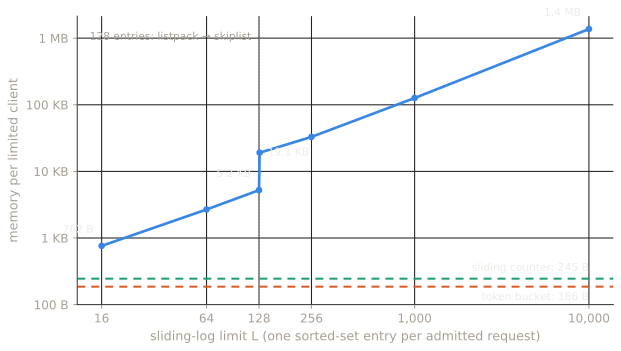
The sliding log stores one entry per admitted request, so it grows with the limit, and it has a cliff. Redis keeps a sorted set of up to 128 entries as a compact listpack, about 41 bytes per entry here. The 129th entry converts it to a skiplist plus a hash table, and the same client jumps from 5.2 KB to 19.1 KB: 3.6× the memory for one more request. Past that it costs 126 to 137 bytes per entry. A limit of 1,000 is 126.4 KB per busy client, so 10,000 busy clients need about 1.3 GB. The same clients on a sliding-window counter need 2.5 MB.
The 128 is Redis's zset-max-listpack-entries default. Raising it moves the cliff, but listpack operations are linear in their size, so it trades memory for CPU.
One big key can stop Redis
Redis runs one command at a time, and a script is one command. Before counting, the sliding-log script removes expired entries with ZREMRANGEBYSCORE, normally a handful. But when a client uses its whole limit and then goes quiet for longer than the window, its next call removes everything at once, and nobody else is served until it's done.
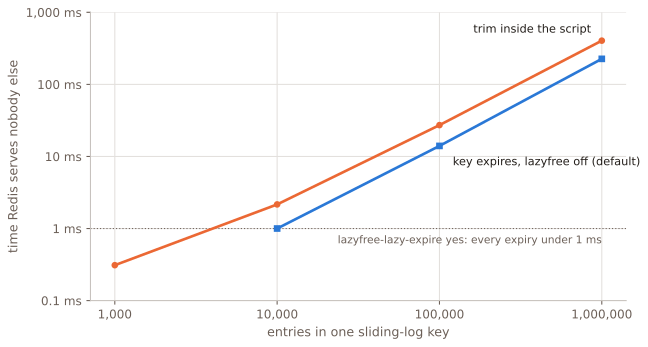
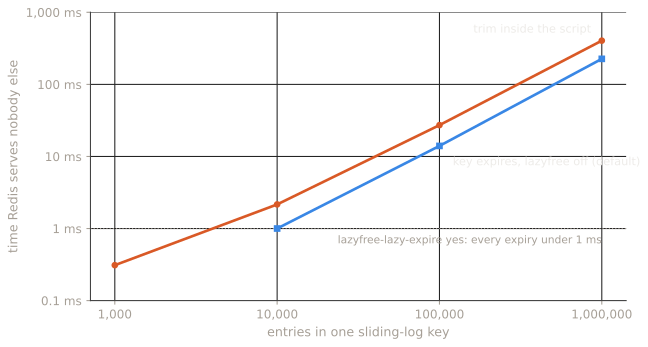
SLOWLOG. Expiry: Redis's own latency monitor. Median of 5 and 3 runs.Trimming 100,000 entries in one call took 27 ms, and 1,000,000 took 404 ms. The key's own expiry isn't better by default: with lazyfree-lazy-expire no, Redis 7.0's default, it frees the whole set inline, and expiring a 1,000,000-entry log blocked Redis for 226 ms. With lazyfree-lazy-expire yes the memory is freed on a background thread, and no expiry in any run blocked Redis for 1 ms or more.
A limit of 100,000 requests an hour is an ordinary API quota. As a sliding log, that's 100,000 entries per busy client, around 14 MB each, and a stall of about 27 ms whenever one of them comes back after a quiet hour. For limits that size, a sliding-window counter does the same job with two integers.
The timestamp-as-member bug
Some sliding-log examples write ZADD key now now: the time is the score and also the member. But sorted-set members are unique, so two requests in the same millisecond share one entry. The second ZADD updates the first instead of adding to it, ZCARD undercounts, and the limiter admits more than its limit. I ran the same script with different members against a limit of 100 per 10 seconds, with requests arriving at random at a steady rate for 2 seconds:
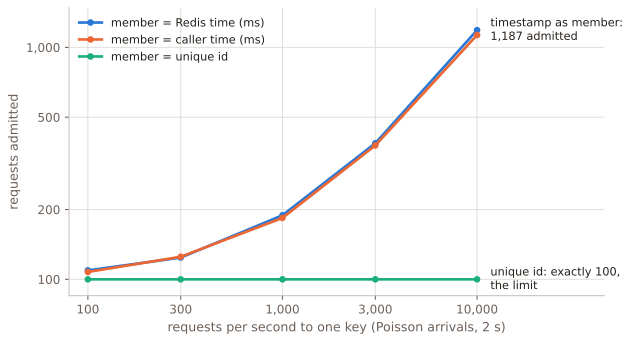
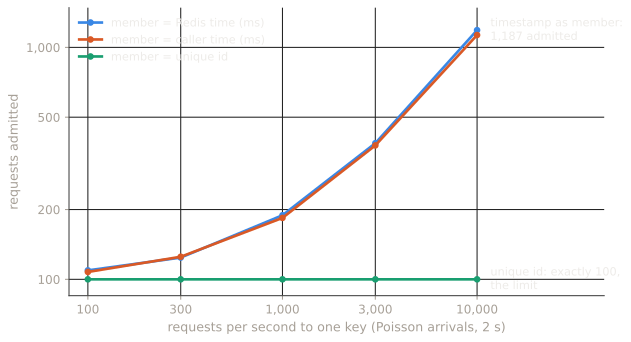
| Requests per second | Member: Redis time (ms) | Member: caller time (ms) | Member: unique id |
|---|---|---|---|
| 100 | 109 | 108 | 100 |
| 300 | 124 | 125 | 100 |
| 1,000 | 189 | 184 | 100 |
| 3,000 | 386 | 378 | 100 |
| 10,000 | 1,187 | 1,130 | 100 |
At 100 requests a second about 9% too many got through, small enough to pass for noise. At 1,000 a second it was 89% over, and at 10,000 it was 11.9× the limit. With 16 workers sending as fast as they could, a limit of 1,000 let through about 51,000 requests. Whose clock it was made no difference: Redis's time and the caller's time failed the same way.
The fix is free: keep the time as the score and make the member unique, like a request id or the time plus a random suffix. Redis's time in microseconds happened to be exact in every run, because each script takes several microseconds and so no two can share one. I'd still use an id, which doesn't depend on timing at all.
EVAL, EVALSHA or FCALL
There are three ways to run the same script. EVAL sends the whole script with every call. EVALSHA sends its SHA-1 hash, for a script Redis has already cached. Redis 7 adds functions: you load a library once with FUNCTION LOAD and call it by name with FCALL.
| Call | Bytes per request | Decisions per second | Redis CPU per decision |
|---|---|---|---|
EVAL | 695 | 39,322 | 24.0 µs |
EVALSHA | 113 | 44,041 | 21.4 µs |
FCALL | 77 | 43,899 | 21.8 µs |
In these runs EVAL cost 2.5 µs more Redis CPU per decision and about 11% of throughput. EVALSHA and FCALL performed the same. The real difference is what survives:
- The script cache lives in memory only. After a restart,
SCRIPT EXISTSreturned false andEVALSHAfailed withNOSCRIPT. - It isn't replicated either. With the script loaded on the primary,
EVALSHAon its replica failed withNOSCRIPT, so the first call after a failover fails too. - Functions are saved in the RDB file and replicated. After the restart, and on the replica,
FCALLjust worked.
go-redis hides the NOSCRIPT case: Script.Run sends EVALSHA, and when Redis answers NOSCRIPT it resends the script with EVAL. After the restart that cost one failed call and one extra round trip, and the decision succeeded. A client without that fallback reports an error instead.
var tokenBucket = redis.NewScript(tokenBucketLua)

// Allow spends cost tokens from the bucket at key and reports whether the request may proceed.
func Allow(ctx context.Context, rdb *redis.Client, key string, capacity, perSecond, cost int) (bool, int64, error) {
	// Run sends EVALSHA and falls back to EVAL on NOSCRIPT: after a restart or a failover.
	res, err := tokenBucket.Run(ctx, rdb, []string{key}, capacity, perSecond, cost).Int64Slice()
	if err != nil {
		return false, 0, err
	}
	return res[0] == 1, res[1], nil
}
Redis Cluster: declare every key
The fixed-window script from my earlier study builds its key inside the script, KEYS[1] .. ':' .. window, one counter per window. On a single Redis that's fine. I ran it on a three-node cluster for 1,000 different users:
| Script | Worked | Failed |
|---|---|---|
| Builds the window key inside the script, no hash tag | 331 | 669 |
Same, with a hash tag: {user:42} | 1,000 | 0 |
| Declares two keys, no hash tag | 0 | 1,000 |
| Declares two keys with the same hash tag | 1,000 | 0 |
The first row is the dangerous one. Redis rejected the undeclared key with Script attempted to access a non local key in a cluster node only when the key lived on another node. So the script worked for a third of the users, the ones whose window key happened to land on the same node. It passes on a single Redis and in a small test, and works or fails per user depending on where slots live, which changes when the cluster is resharded.
Declare every key a script touches in KEYS, and give keys that belong together the same hash tag, like {user:42}:tokens and {user:42}:log, so Cluster keeps them in one slot. In my test a hash tag on the base key also made the derived window keys work for all 1,000 users, but declaring every key is the safer habit.
When Redis is slow or gone
Atomic scripts make the limiter correct; they don't make it available. If Redis can't answer, the limiter has to pick a side. For most APIs, refusing every request because the limiter is down is worse than letting traffic through for a few seconds, so the LimitYourAPI SDK fails open: a short timeout, the request proceeds, and the miss is recorded. Endpoints where overuse costs real money are the exception; there, failing closed is the safer default.
What I'd do
- Make every decision one atomic step. For a fixed window,
INCRandPEXPIREinMULTIis enough and was the cheapest option I measured; use a script when the decision has to read state first. - Budget 2.5 to 3.5 times the Redis CPU of a
GETfor each scripted decision. - Use the sliding log for small limits only, ideally 128 or fewer, and a sliding-window counter for large ones.
- Never use a timestamp as a sorted-set member.
- Turn on
lazyfree-lazy-expireif any key can grow large. - On Redis 7, load scripts as functions and call them with
FCALL, or make sure your client resends the script onNOSCRIPT. - Declare every key in
KEYS, and hash-tag keys that belong together. - Read the time inside the script with
TIME.
Data and code
The harness (Go), the raw data from every run, and the analysis that produces each number and chart in this post are in one download. ./run_all.sh reruns everything in about 30 minutes. It's a follow-up to my paper on how Redis limiters behave under concurrency, doi:10.5281/zenodo.23467402.
- Redis
- Lua
- Go
- Rate limiting
- Performance
- Distributed systems
More from LimitYourAPI
Hiring a software engineer? Here's how I work and what I'm looking for.